If you manage a Google Business Profile, open its contact settings this week. Google has started adding Facebook Messenger links to business profiles, and on ours it did it without us touching anything. That can bring you a new way for customers to reach you, or it can send them to an inbox nobody reads. Here is what changed, what we found on our own profile, and what to check on yours.
Published November 19, 2026. Written by Rares Rata, who runs SEO and AI Search at We Lead in Naples. Based on what we saw in the We Lead Agency Business Profile on November 19, 2026, two Search Engine Roundtable reports from October 28 and November 16, 2026, and Google’s Business Profile Help page on chat. Google’s help page does not mention Messenger yet, so treat anything beyond what we show here as unconfirmed.
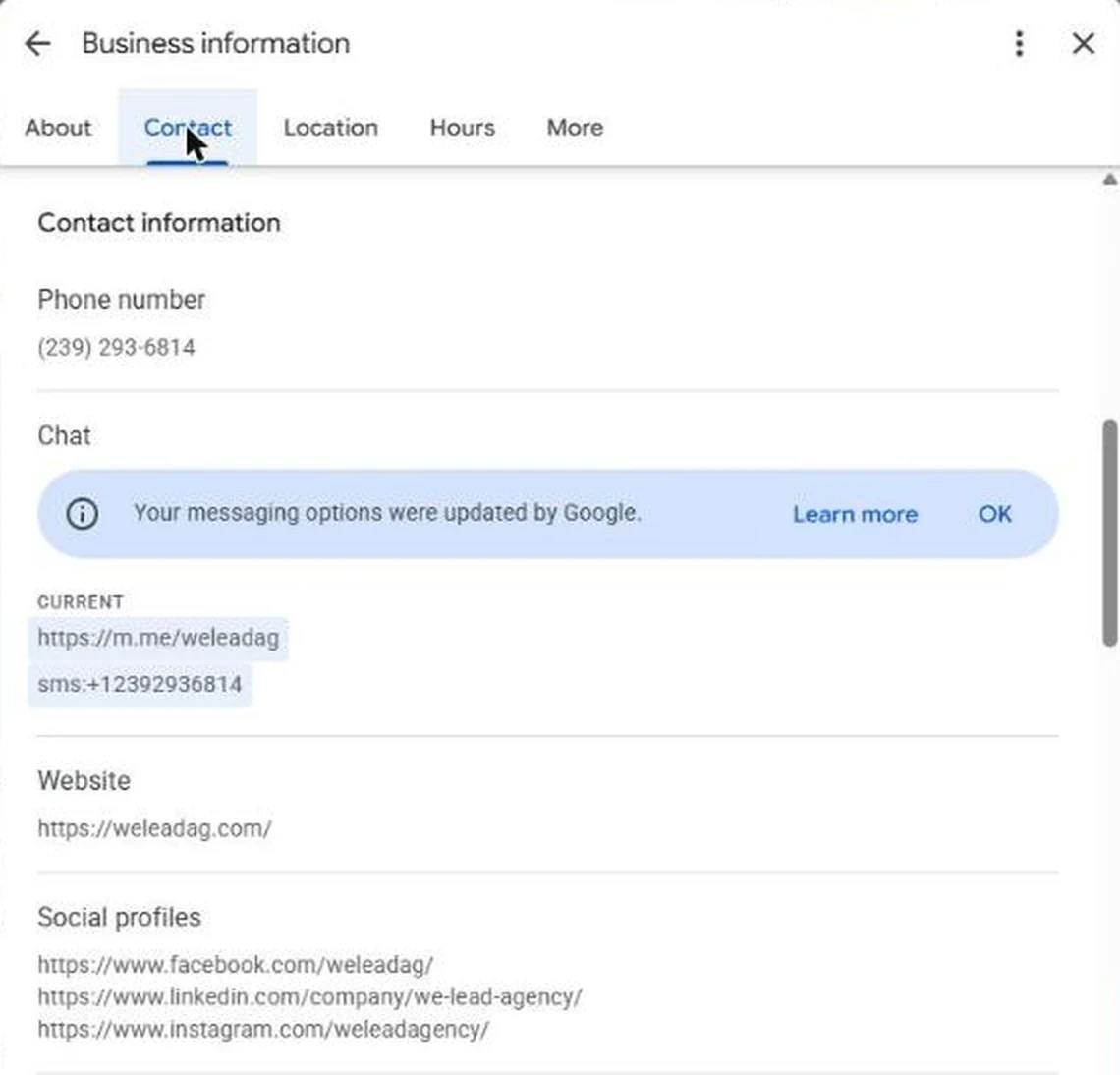
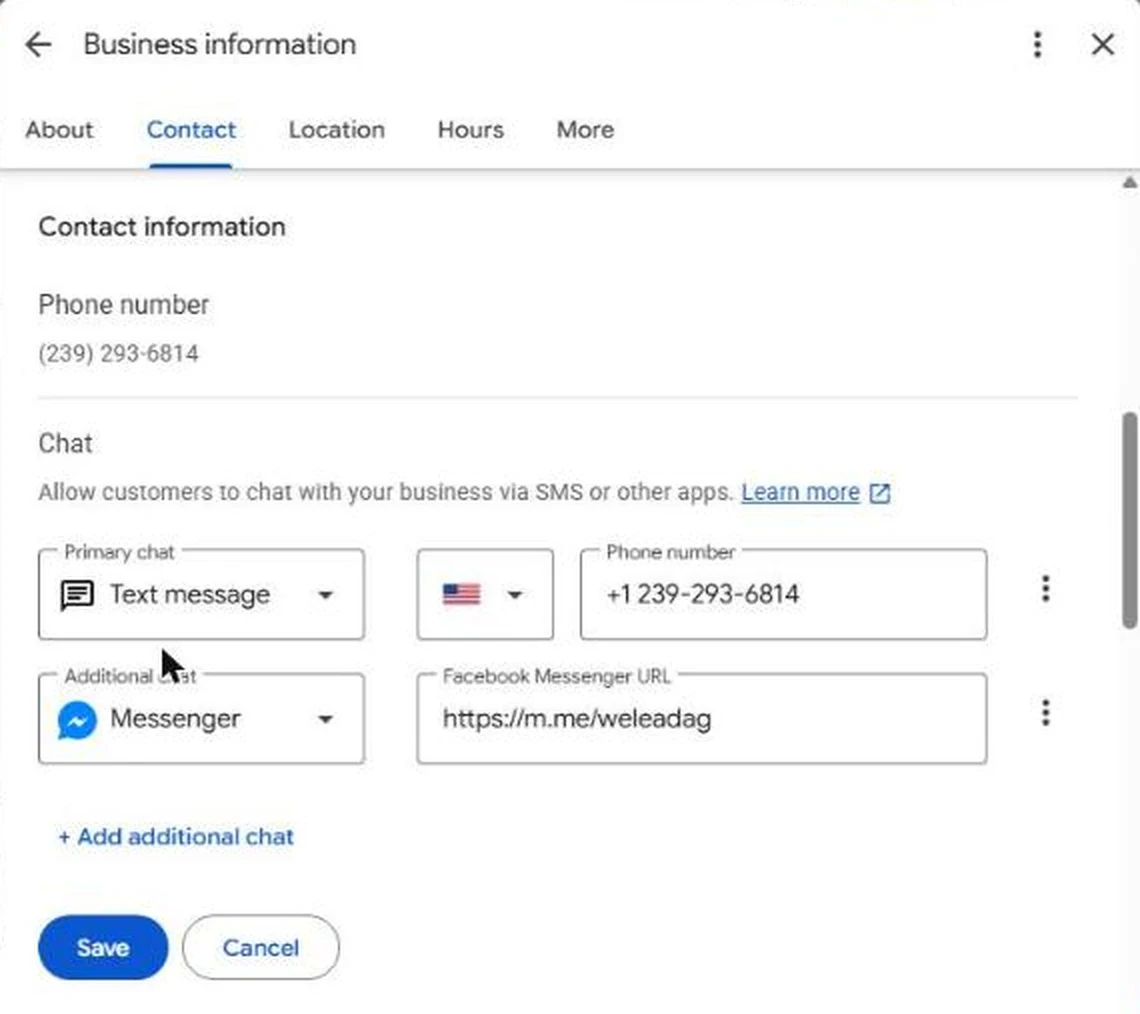
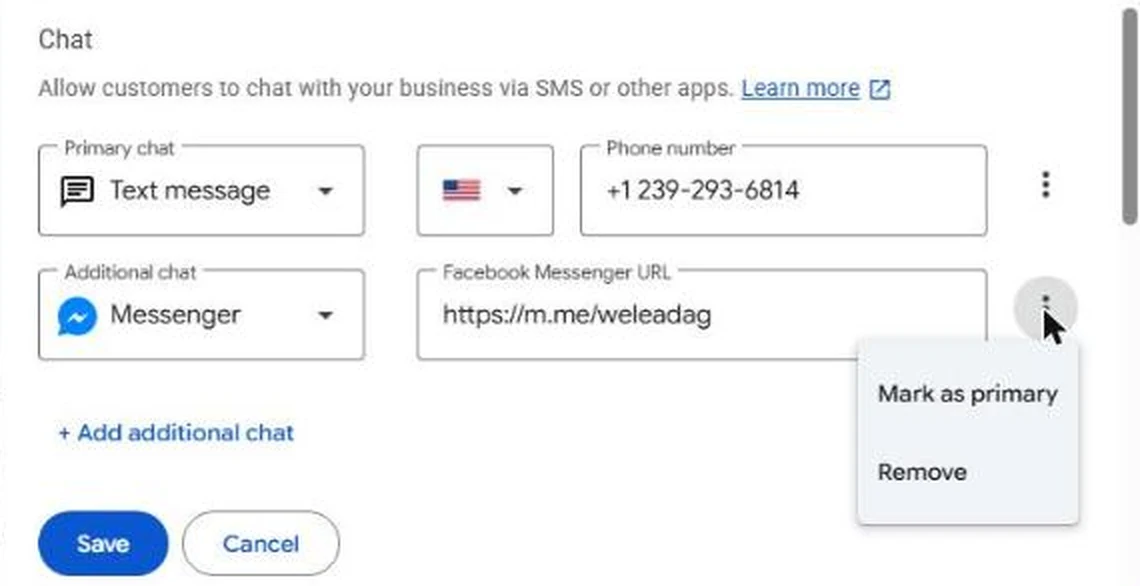
Open your Business Profile, select Edit profile, then Contact, and look at Chat. If Google added Facebook Messenger, you will see the note “Your messaging options were updated by Google” and an m.me link to your Facebook Page. Keep it only if someone actually answers your Facebook messages. If nobody does, the three-dot menu next to the Messenger line has a Remove option. In our profile, text message or WhatsApp can be the primary chat, and Messenger shows up as an additional chat.
What did Google change?
On October 28, 2026, Search Engine Roundtable reported that Google was emailing businesses to tell them it had automatically added Facebook Messenger links to their Business Profiles. These are m.me links, Meta’s short links that open a Messenger conversation with a Facebook Page. Its editor, Barry Schwartz, wrote that he did not remember Google adding m.me links to profiles before.
On November 16, the same site reported that owners can now add Messenger themselves, as an option in the Chat section of their profile. Local search consultant Syed Amir spotted it. According to the report, Google Ads already offered Messenger as an option before it came to Business Profiles.
Did Google add Messenger to our profile?
Yes. On November 19 we opened the contact settings of the We Lead Agency profile. Above the chat options was a note from Google: “Your messaging options were updated by Google.” Under it, two chat options were listed: a link to our Facebook Page in Messenger, m.me/weleadag, and the text message number we had set up ourselves. We never added the Messenger link.
How to check your own profile
Open your Business Profile
Sign in with the Google account that manages the profile and search your business name on Google. The manager panel with Edit profile, Reviews and Photos appears above the results.
Go to Edit profile, then Contact
This is where Google lists your phone number, chat options, website and social profiles.
Read the Chat section
Look for the note “Your messaging options were updated by Google” and for an m.me link. Select the chat options to see which one is primary and which are additional.
Make sure the link is your own Page
The part after m.me/ should match the username of your Facebook Page. Ours is m.me/weleadag, and our Page is facebook.com/weleadag. If it points to an old or wrong Page, change it or remove it.
Which chat options can you choose?
This is what the editor offered in our profile, a US business, on November 19:
| Where | What we could choose | Worth knowing |
|---|---|---|
| Primary chat | Text message or WhatsApp | These are the only two options in Google’s help page on chat |
| Additional chat | WhatsApp or Messenger | Messenger asks for your Page’s m.me link |
| Three-dot menu on each line | Mark as primary or Remove | So a Messenger line can be moved to primary from here, even though it is not in the primary list |
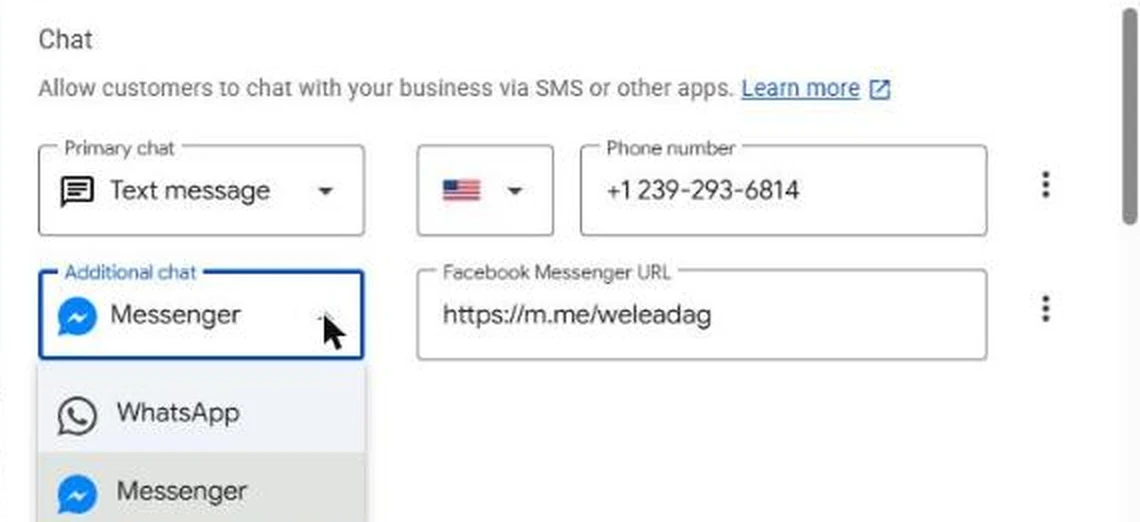
Google’s help page on chat still describes only WhatsApp and text message. It says chat options are available only in select regions, so yours may look different, and that if you add both, only the text message option is shown to customers. It does not say yet how Messenger fits into that.
Who answers those messages?
This is the part that matters for a small business. A Messenger link does not send the conversation to Google. It opens Messenger and starts a chat with your Facebook Page, so the message lands in the Page’s inbox, the same place your Facebook messages already go. If nobody on your team gets notified about those, a customer who tapped the chat option from Google is left waiting, and most will not wait long before calling someone else.
- Check who receives Page messages. Open your Facebook Page’s inbox and see who has access and who gets notifications on their phone.
- Decide where leads should go. If your team answers texts but rarely opens Facebook, text message is the safer primary chat.
- Test it as a customer would. Send your own business a message through the link and see how long it takes for someone to notice.
Where do customers see the chat option?
Not everywhere. When we looked at our profile on November 19 on a desktop computer, Google Search showed Website, Save, Share and Call, and Google Maps showed Save, Send to phone and Share, with no chat button in either. Google’s help page does not say where chat options appear, and we have not yet checked the phone apps, so we will add that here once we have.
Should you keep Messenger on your profile?
Keep it if your Facebook Page inbox is answered as quickly as your phone. Remove it, or keep text message as the primary chat, if Facebook is a channel your team checks once a week. A chat option nobody answers is worse than no chat option at all. There is also no sign that chat options change your position on Google Maps: Google describes local results as based mainly on relevance, distance and prominence, and says nothing about chat. We have not changed ours yet. The first thing we are checking is who receives our Facebook Page messages.
Frequently asked questions
Other surprises on your profile? Google has also been adding booking buttons that some owners never set up: here is what to check about the Book Online button. If your business is hard to find on the map in the first place, start with why a business does not show up on Google Maps. Our local SEO work in Naples covers the profile, the website and the reviews together, and the free audit includes a check of your Business Profile.
About the author. Rares Rata runs SEO and AI Search at We Lead in Naples, FL, and maintains the websites the agency builds. For another place customers may now find your business, see how to claim your business in ChatGPT.